Repair a FIT file that won't upload
When a watch dies mid-activity or a sync gets cut off, the file can end up truncated or damaged, and Strava or Garmin Connect refuses it. Open it here. The editor keeps every record it can read, drops the broken part, and writes a clean, valid file with the totals recalculated.
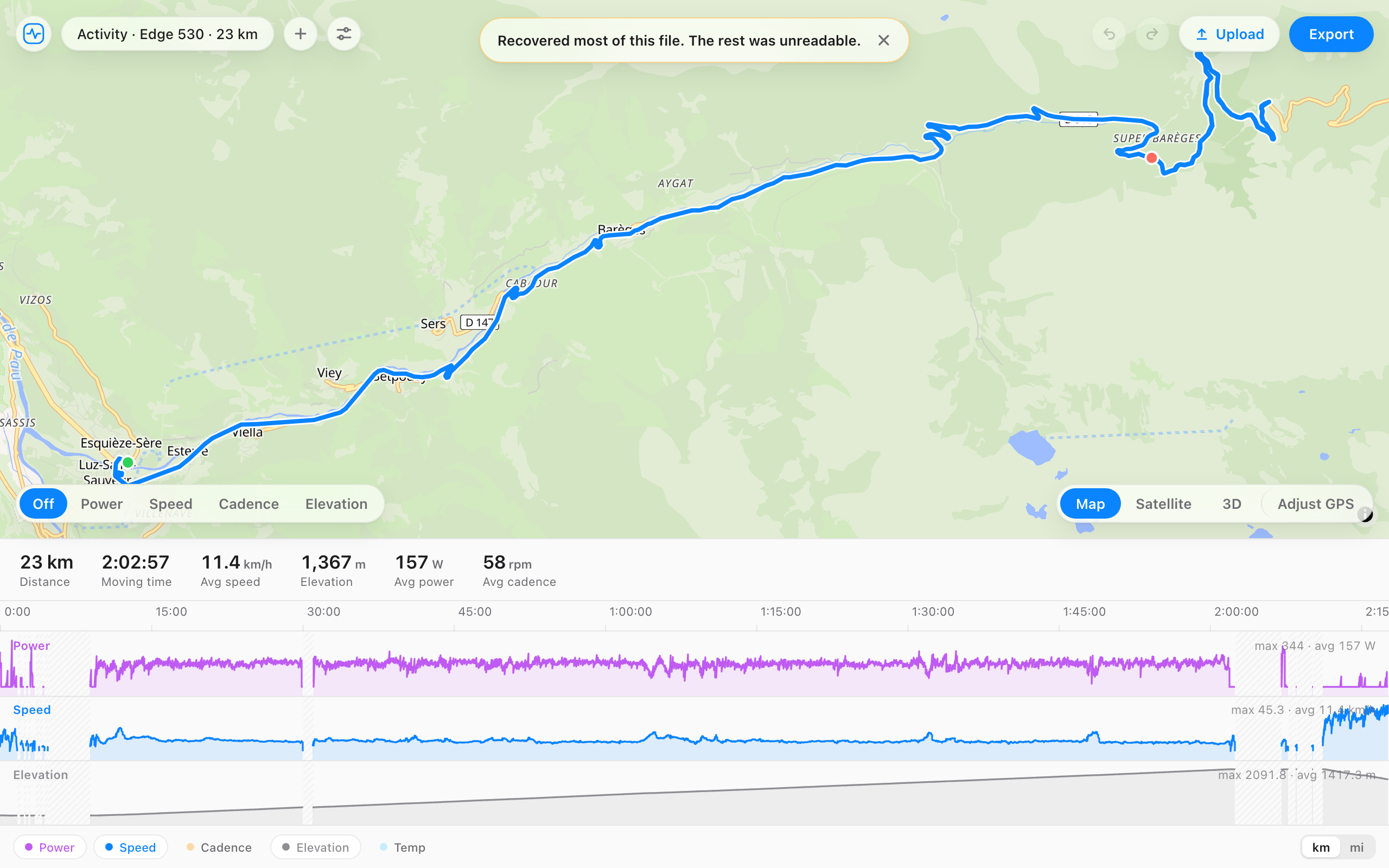
A ride whose file was cut off when the watch died. Press Repair.
The striped end is the part no app can read.
When it helps
- Strava says the file is corrupted, or that there was an error processing your activity.
- Garmin Connect says the file is invalid or corrupt.
- Your watch ran out of battery or crashed before it finished saving.
- A sync was interrupted, and the copy on your phone or computer is damaged.
- The file opens nowhere else, and you just want the run or ride back.
How it works
- Copy the original file off the device if you can, rather than one from a failed sync. On a Garmin it's in the Garmin/Activity folder.
- Open it here, or drag it onto the page.
- If part of it was damaged, the editor recovers what it can and says so. Check the map and the totals.
- If the sport now reads Activity, set it again in the details panel. Many devices write the sport at the end of the file, so a cut-off file can lose it.
- Export the repaired file and upload it to Strava or Garmin Connect.
Questions
- My file opens fine here. Why won't it upload?
- Export a fresh copy anyway. The editor writes a new, valid file with a correct checksum, and that alone often gets past the upload error. If Garmin Connect then says it's a duplicate, delete the original activity first.
- What can't be repaired?
- Data that was never written. If the device died before saving the last few minutes, those minutes aren't in the file. Some older devices use a compressed timestamp format the editor can't read yet, and settings, sleep, or course files aren't activities, so they won't upload anywhere.
- Is this different from fixing bad data?
- Yes. Repair is for a file that won't open or won't upload. If the file uploads but has a heart rate spike or a GPS jump in it, the fix tool is the one you want: select the bad stretch and cap, smooth, or clear it.
- Does my file get uploaded to repair it?
- No. The repair happens in your browser, so the file never leaves your computer. Most repair services send it to their server.